
London based entrepreneur, cybersecurity analyst doing a PhD in AI
Beyond the Chatbox: How AI Will Change UI/UX.
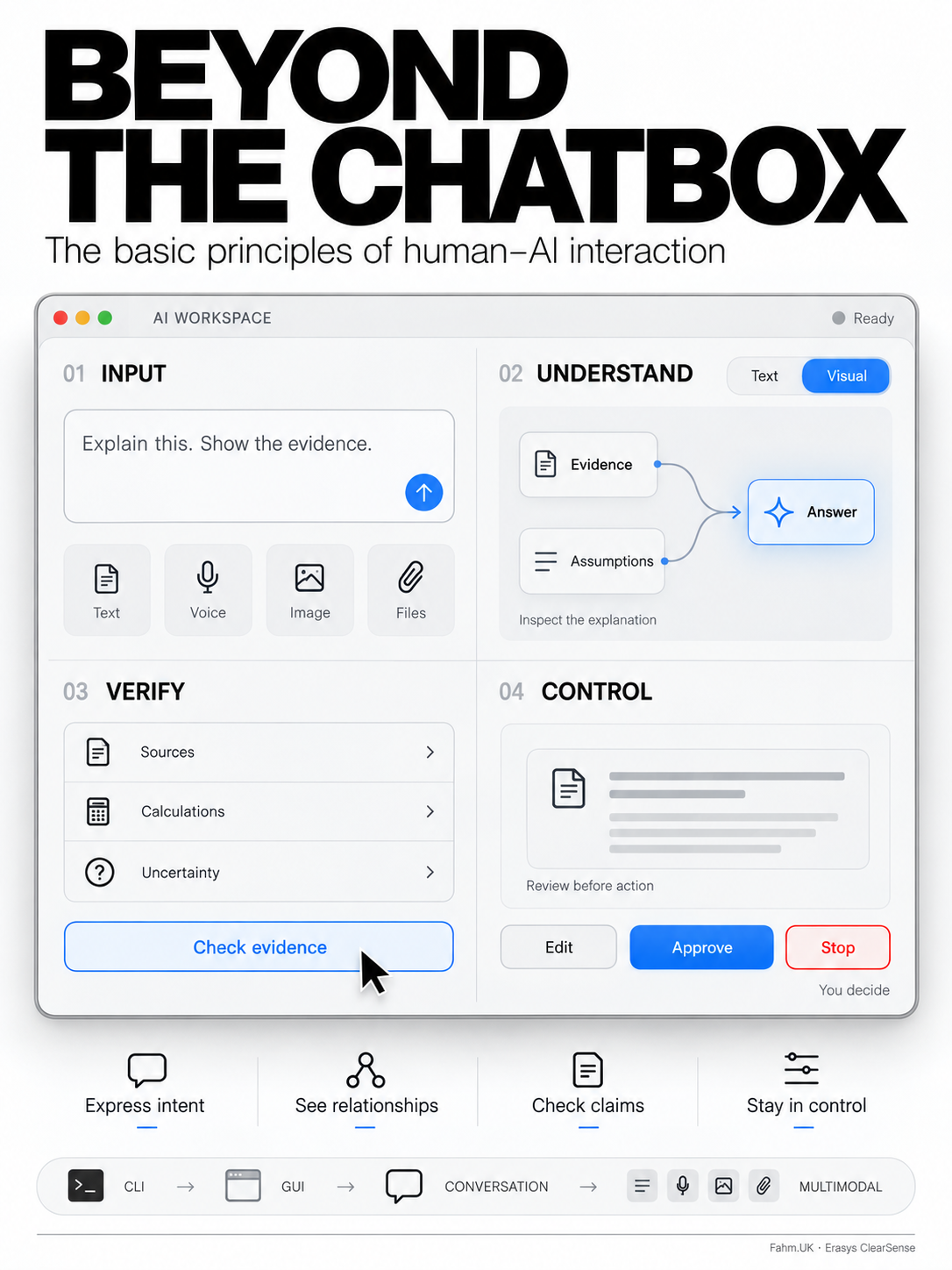
AI has transformed the GUI we became used to back to a CLI type interface. The next evolution of UI/UX will bring back "visual intelligence".
Beyond the Chatbox: How AI Will Change Human–Computer Interaction
From typing commands to inspecting decisions, the next interface must help us understand, verify and direct the intelligence we use.
Ask a computer to explain why a business is losing money, and it may now produce an elegant essay in seconds. Read it carefully, however, and the real work begins. Which figures came from the accounts? Which explanations are assumptions? Does falling revenue reflect fewer customers, lower prices, or both? What would happen if one assumption changed?
The machine has produced an answer. The interface has not necessarily helped us understand it.
This is the next challenge for human–computer interaction, or HCI: the study and design of how people work with computers. As artificial intelligence becomes mainstream, the question extends beyond what a model can generate to what a person can meaningfully inspect, challenge and use.
We have spent decades making computers easier to operate. We must now make their outputs easier to evaluate.
The history helps explain why.
In command-line interfaces, users typed instructions in a syntax the machine recognised. Precision was powerful, but it demanded knowledge: the command, its options, the correct sequence. The user carried much of the burden of translating an intention into executable instructions.
Graphical user interfaces shifted some of that burden onto the screen. Windows, icons, menus and pointers made available actions visible. People could recognise a folder, select an object and manipulate it directly.
This transition had several pioneers. Douglas Engelbart’s 1968 demonstration brought together a mouse, hypertext and collaborative computing. Xerox PARC’s Alto subsequently helped establish the graphical environment from which modern personal computing developed. Apple and Microsoft later brought graphical computing to much wider audiences. This was a long evolution, with overlapping approaches, rather than one invention replacing everything overnight.[1][2]
The web made the interface a gateway to networked information and services. Smartphones brought touch, cameras, location and portable connectivity into everyday interaction. Voice assistants made spoken requests familiar. Each development shortened some part of the distance between intention and action.
Then generative AI brought conversation to the centre.
Instead of finding the correct menu, we could describe a goal: summarise this report, explain this contract, compare these options.
There is an intriguing irony here. After decades of graphical progress, one of our most advanced technologies arrived primarily as a box into which we type.
The resemblance to a command line is superficial: natural language is far more flexible than terminal syntax. Nevertheless, the blank box leaves important questions unanswered. What can this system do? What information does it need? What assumptions will it make? How do I know whether it has succeeded?
Conversational fluency does not resolve those interface problems.
The next stage will therefore combine conversation with direct manipulation, visual explanation and controlled delegation. Command lines and graphical interfaces will persist where they remain useful. AI will add new ways of moving between them.
We can already see this in multimodal interaction. Google has introduced Gemini Live capabilities that let users share a camera or screen and receive visual guidance. The interaction becomes “look at this with me”, alongside “listen to my question”.[3]
Imagine a technician showing a component to an assistant, an analyst pointing to an unusual movement in a chart, or a student circling the exact step in a calculation that they cannot follow. A shared visual reference reduces the effort of describing what is already in front of us.
As such interactions extend into glasses and spatial displays, guidance could appear beside the object or task concerned. The opportunity is considerable, but so is the design responsibility: people should be able to tell when a camera is active, what is being shared and how to stop it.
Another development is the interface generated for the task.
Google’s announced experiments with “visual layout” and “dynamic view” illustrate this direction: the system can produce a tailored visual or interactive response instead of displaying every answer in the same format.[4]
Consider what that could mean in practice. A question about a project could produce an editable timeline. A question about competing suppliers could produce a comparison table with visible criteria. A question about a budget could produce a calculator whose assumptions the user can adjust.
These are examples of the design direction, rather than promises that every system can already deliver them reliably.
The important change is that the answer becomes something a person can work with. The user can vary a parameter, inspect a relationship and see whether the conclusion still holds.
This brings us to visual reasoning.
At Fahm.UK, we now provide a diagram with every answer to show “visual reasoning”. We have made it a requirement of the response: an accompanying representation intended to make the explanation’s structure easier to inspect.
The principle is simple. A user should be able to see how the relevant concepts connect, which assumptions support a conclusion and where a missing step may lie.
That ambition has a foundation in learning research. Richard Mayer’s work on multimedia learning describes how people can learn more effectively from an appropriate combination of words and pictures than from words alone. The same research tradition emphasises reducing irrelevant material and placing related information together.[5]
A useful diagram can put relationships in front of us that prose requires us to remember across several paragraphs.
For example, an explanation of falling profit could separate revenue from costs, then separate revenue into price and volume. An investigation of a delivery delay could show dependencies and bottlenecks. A comparison of policy options could make the competing objectives explicit.
The diagram must earn its place. A decorative illustration adds little. A misleading arrow can imply causation where there is only association. A crowded graphic can make a simple answer harder to understand.
Requiring visual reasoning should therefore mean requiring a meaningful explanatory structure, with accessible text alongside it. Users should retain the option to collapse a visual, navigate it with a keyboard or read a textual equivalent. A design principle should support human needs rather than become a compulsory obstacle.
There is also an essential distinction between an explanation of an answer and a record of the model’s internal computation.
A diagram generated by an AI is not automatically a window into how that AI actually reached its conclusion. Anthropic’s research has shown that written chains of thought can omit influences on a model’s answer. Turning such an explanation into boxes and arrows does not establish its faithfulness.[6]
The standard should be an explanation whose claims, assumptions and relationships can be checked.
Suppose an assistant recommends expanding a business. Its visual explanation should distinguish supplied sales figures from projected growth, identify the calculations linking them, and show which assumptions matter most. Where possible, numerical results should come from reproducible calculations connected to identifiable inputs.
The visual then becomes a place to question the answer.
That is why verification tools belong at the centre of the next interface.
New tools such as Erasys ClearSense should be useful in this emerging workflow. Erasys describes ClearSense as an AI answer sense-checker that analyses logical consistency and extracts verifiable claims. I mention it with an interest in the work: my product-development role at Erasys informs this perspective.[7]
The need extends well beyond any one product.
A response can be internally consistent while resting on false premises. It can also contain individually accurate statements assembled into an unsupported conclusion. Effective verification has to distinguish those problems.
Imagine selecting a sentence in an AI answer and seeing its supporting source, the relevant passage, the date of the evidence and any unresolved contradiction. Imagine selecting a number and opening the calculation that produced it. Imagine seeing a clear distinction between information supplied by the user, externally retrieved evidence and an inference made by the system.
These should become ordinary interface functions.
A second model agreeing with the first would not, by itself, establish truth. Nor should a reassuring badge conceal what was checked. The interface should disclose the scope and limits of verification: perhaps the arithmetic was tested, while the underlying market forecast remains uncertain.
The next generation of AI tools should make these distinctions easier to understand.
We need workspaces that connect claims to evidence. We need interactive simulations for testing assumptions. We need controls that let people inspect and correct the context an assistant is using. We need teaching modes that offer a hint, an example or a diagram before presenting a complete solution.
We also need better interfaces for AI agents: systems that can take actions across applications.
When an assistant can modify files, organise a calendar or prepare a transaction, the user is delegating work. A chat transcript alone may be a poor way to supervise it.
A useful interface would show the proposed plan, the resources required, the actions completed and the decisions awaiting human approval. It would distinguish a draft from a sent message and an attempted operation from a confirmed result. It would make stopping, correcting and recovering from an action straightforward, including explaining when an action cannot be undone.
These priorities have deep roots in HCI. The 2019 Guidelines for Human–AI Interaction, developed by Saleema Amershi and colleagues, address how systems should behave at first use, during interaction, when they are wrong and as they evolve over time.[8]
As AI becomes more capable, those concerns become more consequential.
There is a commercial opportunity here for developers building the tools around models: evidence viewers, diagram editors, source-comparison panels, simulation environments, approval controls and verification services.
For the technology communities of Israel, Britain and elsewhere, this is a substantial area of product development. A powerful model does not automatically produce a usable professional system. The surrounding interface determines how easily people can understand its limitations and direct its capabilities.
We should measure these interfaces accordingly. Did the user understand the explanation? Detect the planted error? Identify the unsupported assumption? Complete the task accurately? Recover when something went wrong?
A faster answer is valuable when the whole task becomes faster. If it takes longer to untangle and verify the output than it would have taken to do the work, speed of generation is a poor measure of success.
The command line asked us to learn instructions. The graphical interface made actions visible. Conversational AI lets us express intentions in ordinary language.
The next interface must help us examine what happens after that intention is expressed.
It should let us see the argument, inspect the evidence, change the assumptions and retain control of the action.
AI will have changed human–computer interaction for the better when its users can say more than “it answered me”.
They should be able to say: “I understand it well enough to question it.”
Sources
- Doug Engelbart Institute, highlights of the 1968 demonstration: https://dougengelbart.org/content/view/276/000/
- Computer History Museum, Xerox Alto: https://www.computerhistory.org/revolution/story/347
- Google, Gemini Live visual guidance: https://blog.google/products-and-platforms/products/gemini/gemini-live-updates-august-2025/
- Google, generative interfaces and Gemini Agent, 18 November 2025: https://blog.google/products-and-platforms/products/gemini/gemini-3-gemini-app/
- The Cambridge Handbook of Multimedia Learning: https://www.cambridge.org/core/books/cambridge-handbook-of-multimedia-learning/09E09224829AB8D3D327EF8A0E9B5288
- Anthropic, Reasoning models don’t always say what they think: https://www.anthropic.com/research/reasoning-models-dont-say-think
- Erasys product description: https://erasys.co.uk/ ; ClearSense product link: https://erasys.co.uk/clearsense
- Microsoft Research, Guidelines for Human–AI Interaction: https://www.microsoft.com/en-us/research/project/guidelines-for-human-ai-interaction/
Editorial note: The Fahm.UK diagram-per-answer statement is supplied by the author. Erasys’ ClearSense’s description is drawn from my own personal work on the product in the capacity of Head of Product Design. No independent evaluation of either product’s effectiveness is claimed.
Related Topics